
Table of Contents
TeraInvoice supports multiple payment methods to help you get paid faster
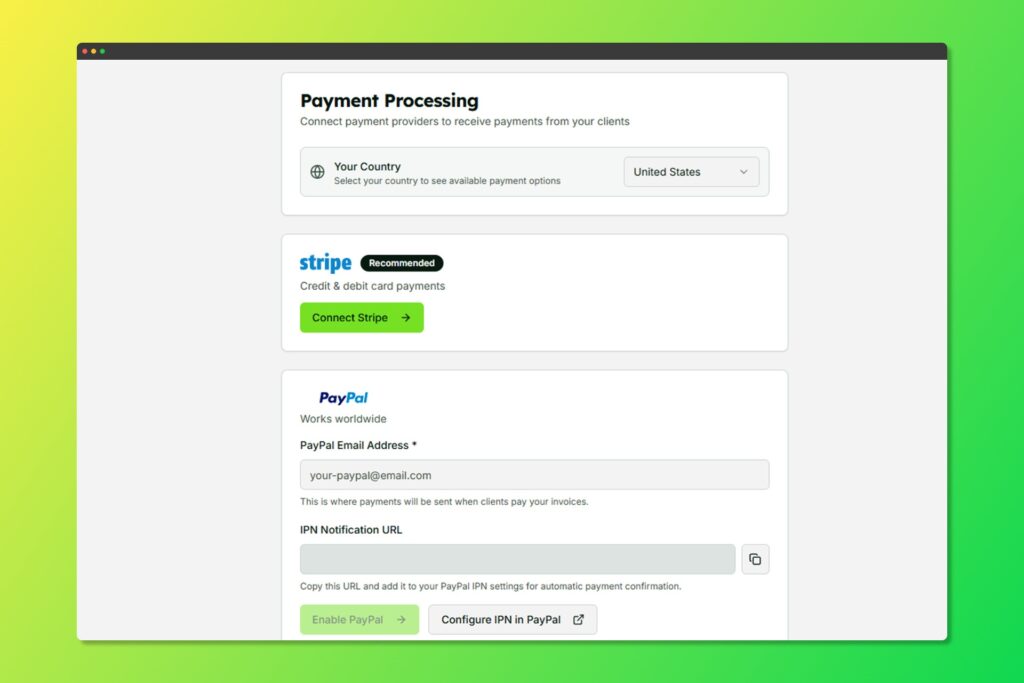
Configure your payment methods in Settings
Stripe Integration #
Accept credit/debit cards and other payment methods.
Setting Up Stripe #
- Go to Settings > Payments
- Click Connect Stripe
- Follow the Stripe onboarding process
- Once connected, payment options appear on your invoices
Supported Payment Methods #
- Credit/Debit cards (Visa, Mastercard, Amex)
- Apple Pay
- Google Pay
- Cash App via QR code (where available)
PayPal Integration #
Accept payments via PayPal.
Setting Up PayPal #
- Go to Settings > Payments
- Enable PayPal
- Enter your PayPal email address
- Save changes
Requiring Payment #
When creating an invoice, enable Require Online Payment to:
- Display payment buttons prominently
- Encourage faster payment
- Track payment status automatically
Manual Payment Recording #
For offline payments (cash, check, bank transfer):
- Open the invoice
- Click Mark as Paid
- Select payment method
- Add payment notes if needed


